





Chevy Apple CarPlay and Android Auto are incredible features that add a ton of functionality to your infotainment system. They make driving safer by letting you do certain things hands-free, and they help you stay in touch with the outside world even when you’re traveling.
Guide to Using Apple CarPlay and Android Auto in Your Chevy
Wired Apple CarPlay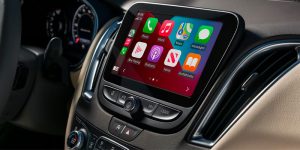
Using Apple CarPlay requires an iPhone running iOS 7.1 or a more recent version of the operating system. Use your phone’s charger to plug your phone into a USB data port in your car. Once your phone is connected to your car, a pop-up from Apple CarPlay will appear on your iPhone’s screen.
Give the application to access your iPhone and then look at your vehicle’s infotainment screen. Apple CarPlay will most likely launch automatically, but if it doesn’t, then just tap the app on the infotainment screen. Now you’re done.
Wireless Apple CarPlay
You need iOS nine or newer to use wireless CarPlay. Go into your phone’s settings and find the Bluetooth section. Once you’ve got that up, go back to your infotainment system and touch the phone icon on the screen. It’ll ask you to connect your phone or pair a device with the system, or you may just see a “+” symbol.
Go back to your phone. You’ll see your vehicle has appeared as one of the Bluetooth devices you can connect to. Select this, check that the code on your phone screen matches the one on your infotainment screen, and then touch “pair” on one or both devices. You may have to give consent for your infotainment system to access your messages and contacts.
Wired Android Auto
You need Android 8.0 or newer for wired Android Auto. Download the Android Auto app onto your vehicle’s infotainment system, then connect your phone to the vehicle’s USB data port. Launch Android Auto on the infotainment screen if it doesn’t open automatically, follow the prompts, accept the terms, and then you’re done.
Wireless Android Auto
Download Android Auto on your infotainment system, then tap the “+” symbol or the options to connect a device to the vehicle. Open the Bluetooth settings on your phone running Android 11.0 or newer, select your vehicle, and then check that the code on your phone screen matches the one on the infotainment screen. Touch “pair” to finish.
If you’re looking for a vehicle with smartphone connectivity, then come to Jennings Chevrolet in Glenview, IL. Contact 855-926-7029 to discuss your options.
Connect with us


Recent Blog Entries
- Chevrolet EV Lineup for 2026: A Glimpse Into the Future of Driving
- The 2026 Chevy Colorado Trims: Find Your Perfect Fit
- 2026 Chevy Trax Trims: Find Your Perfect Match in Glenview, IL
- Everything You Need to Know About the 2026 Chevy Silverado 2500 HD
- Chevy Maintenance Schedule: Keeping Your Vehicle Reliable
Categories
- 2025 Chevy Blazer Glenview, IL
- 2025 Chevy Corvette E-Ray Glenview, IL
- 2025 Chevy Equinox EV Glenview, IL
- 2025 Chevy Equinox Glenview, IL
- 2025 Chevy Silverado 1500 Glenview, IL
- 2025 Chevy Silverado 2500 HD Glenview, IL
- 2025 Chevy Suburban Glenview, IL
- 2025 Chevy Tahoe Glenview, IL
- 2025 Chevy Trailblazer Glenview, IL
- 2025 Chevy Trax Glenview, IL